Your network, on the phone in your pocket
Site status, alarm notifications and channel graphs, without opening a browser or logging into the full web application. Built for the people who need to know what is happening during a storm event, wherever they happen to be standing.
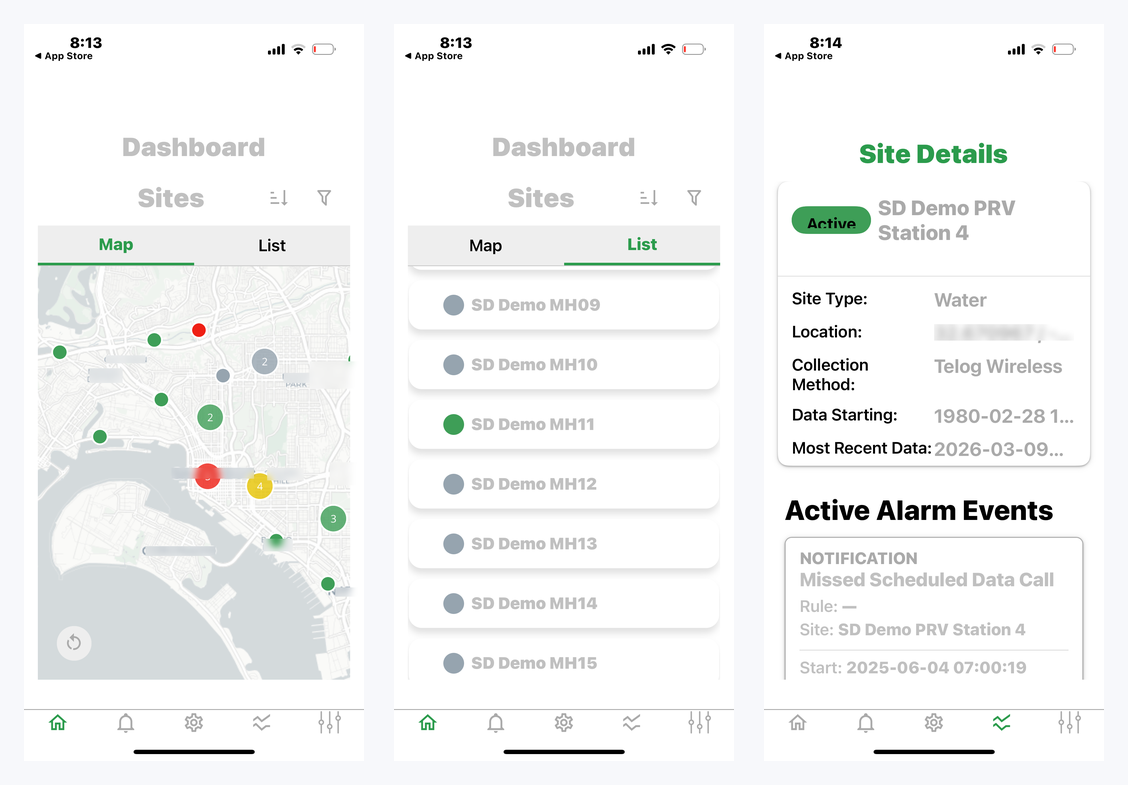
Fast awareness, not a cut-down web app
The app is designed for operators, field staff and managers who need reliable awareness of what is happening across the network at any time — including during storm events and emergency response.
- Site status and real-time data across the whole network
- Push notifications for alarms, direct to the device
- Site detail and channel graphs in the field
- Acknowledging active alarms from the device
- A consolidated view of alarm events across every site
It is included. The mobile app comes with your infinitii flowworks account at no additional cost, and so do custom dashboards — the premium fee that once applied to those has been dropped.
Two ways in, and a filter for the day you need it
Map view
Every site you have access to, as markers on an interactive map, coloured by status. Tap a marker to open that site. Useful when what you need to know is where a site is relative to where you are.
List view
The same sites in a scrollable list you can sort and filter. Tap through to the same site detail page.
Filter by status
Active, Inactive, Late, Alarm and Notification — so you can separate sites that are transmitting normally from sites that have gone quiet, from sites that have actually tripped something.
Filter by site type
Water, Sewer, Climate, Facility, Overflow/Outfall, Rainfall and Hydrometric.
During a storm: filter by Status: Alarm and you get an immediate picture of every site that has triggered, so you can judge where attention is needed across the network rather than checking sites one at a time.
Site detail and channel graphs
Tapping a site from either view opens its detail page: GPS location, how data is collected at that site, the date collection began, the timestamp of the most recent reading, and any alarms currently active.
Below that sits a time series graph of the site's channels, with a date picker to control the range. Narrow it to the window of a storm event and you can see how the readings behaved going into it. A full-screen view is available, which matters on a phone — and makes a tablet a genuinely good tool for reviewing data in a vehicle or a control room.
Accounts with custom dashboards configured get additional channel selection and view options in the mobile graph; otherwise the site opens on its default view. The full graphing feature is in the web application and is not gated behind dashboards.
Push notifications, not SMS
When an alarm triggers in infinitii flowworks, a push notification goes to the device with the details of the event. Tapping it opens the alarm detail view directly in the app.
Push is the more dependable channel. SMS is subject to carrier delivery delays and spam filtering, neither of which you control and both of which matter when the alarm is time-sensitive.
Set the rules up first. Alarm rules are configured in the web application. Push notifications only arrive for alarms you have already set up there, and the app needs notification permission granted at install.
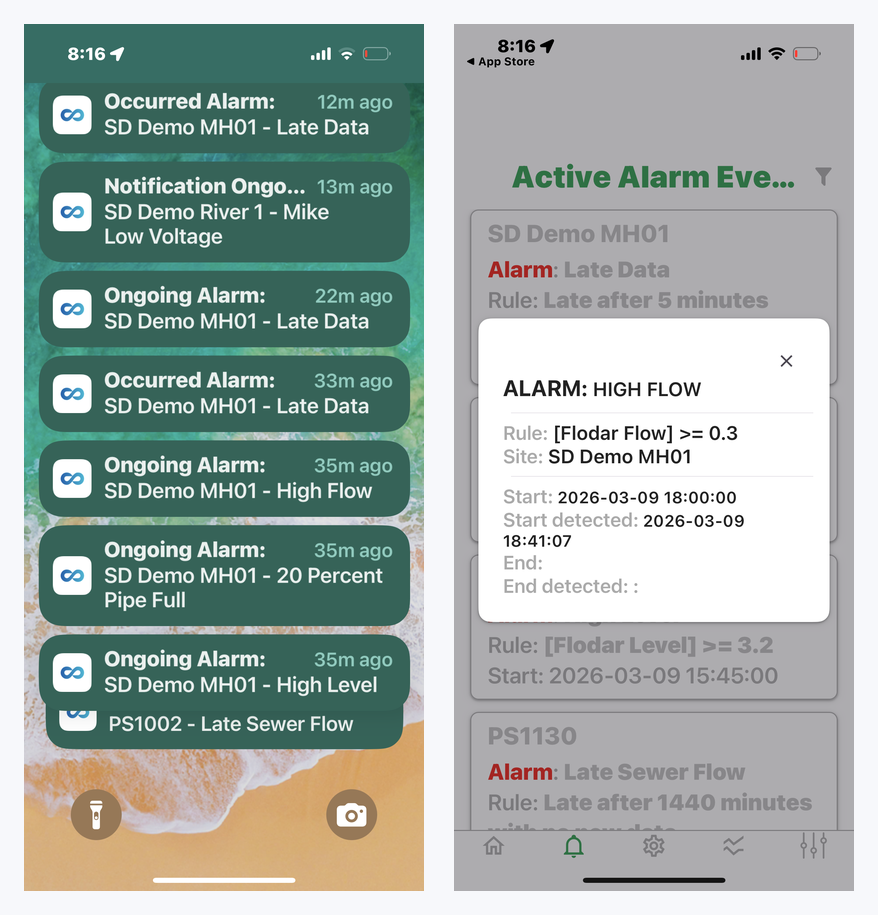
Every active alarm, across every site
The Active Alarm Events view is a consolidated list of alarm events across the whole network rather than one site at a time. It shows what is currently active by default, and a date picker lets you go back over a particular day or range. Tapping any entry opens its detail.
What you need
See it on your own sites
Load your own data and set up alarms, to see how useful and convenient this is.